

mail09 CS2 Settings: Complete Pro Config Guide 2026
 Henry
HenryLooking to frag like one of Brazil’s rising talents? The mail09 CS2 settings featured in this guide cover everything you need to replicate his professional configuration. From his precise mouse sensitivity to his optimized video settings, we’ll break down exactly what makes this setup work at the highest level.
mail09 has established himself as a formidable rifler known for consistent aim and smart positioning. His settings reflect a balance between visual clarity and competitive performance—a combination that helps him perform under pressure on the biggest stages.
mail09 Mouse Settings
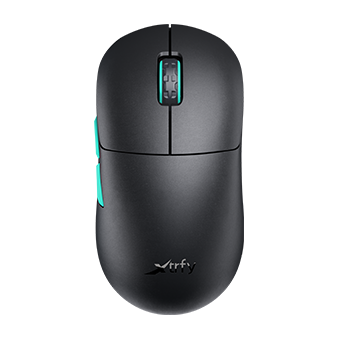
Mouse settings form the foundation of any pro player’s aim. mail09 uses a relatively moderate sensitivity that allows for both precise micro-adjustments and quick flick shots.
| Setting | Value |
|---|---|
| DPI | 800 |
| In-Game Sensitivity | 1.0 |
| eDPI | 800 |
| Zoom Sensitivity | 1.0 |
| Windows Sensitivity | 6 |
| Raw Input | On |
| Mouse Hz | 1000 |
An eDPI of 800 sits comfortably in the mid-range for professional players. This allows mail09 to maintain control during spray transfers while still having enough speed for checking multiple angles quickly.
If you’re experimenting with sensitivity, check out our cs2 mouse sensitivity guide to find your optimal range.
mail09 Crosshair Settings

mail09’s crosshair prioritizes visibility without cluttering the screen. It’s a classic static design that many pros favor for its consistency.
CSGO-tKZ3O-OZhYF-rWMPv-JYyHZ-sPYuDCrosshair Breakdown
| Setting | Value |
|---|---|
| Style | 4 (Classic Static) |
| Color | Green (1) |
| Size | 2 |
| Thickness | 0 |
| Gap | -3 |
| Outline | Yes |
| Outline Thickness | 1 |
| Dot | No |
The negative gap pulls the crosshair lines closer together, creating a tighter center point for precise headshot placement. The thin outline ensures visibility against both light and dark backgrounds—crucial when holding angles on maps like Mirage or Inferno.
mail09 Video Settings

Performance trumps visuals in competitive CS2. mail09’s video configuration prioritizes high frame rates and enemy visibility over graphical fidelity.
| Setting | Value |
|---|---|
| Resolution | 1280×960 |
| Aspect Ratio | 4:3 |
| Scaling Mode | Stretched |
| Display Mode | Fullscreen |
Advanced Video Settings
| Setting | Value |
|---|---|
| Boost Player Contrast | Enabled |
| V-Sync | Disabled |
| NVIDIA Reflex Low Latency | Enabled |
| Multisampling Anti-Aliasing | 4X MSAA |
| Global Shadow Quality | Medium |
| Model/Texture Detail | Medium |
| Texture Filtering Mode | Bilinear |
| Shader Detail | Low |
| Particle Detail | Low |
| Ambient Occlusion | Disabled |
| High Dynamic Range | Performance |
| FidelityFX Super Resolution | Disabled |
The 4:3 stretched resolution makes player models appear wider, potentially making targets easier to track. Many Brazilian pros favor this setup for its combination of visual clarity and performance benefits.
For more optimization tips, our cs2 video settings guide covers additional tweaks.
mail09 Viewmodel Settings
Viewmodel positioning affects how much screen real estate your weapon takes up. mail09 uses a configuration that keeps his weapon visible without obstructing his view.
viewmodel_fov 68viewmodel_offset_x 2.5
viewmodel_offset_y 0
viewmodel_offset_z -1.5
viewmodel_presetpos 3
cl_righthand 1
This right-handed viewmodel with a high FOV keeps the weapon tucked to the side, maximizing visibility in the center of the screen where enemies appear.
mail09 Launch Options
Launch options help CS2 run more efficiently on your system. mail09 keeps his relatively minimal:
-novid -tickrate 128| Option | Purpose |
|---|---|
| -novid | Skips intro video for faster startup |
| -tickrate 128 | Sets offline server tickrate to 128 |
Some players add additional parameters, but keeping launch options clean prevents potential conflicts. If you’re chasing higher frame rates, our cs2 max fps guide explains which settings actually impact performance.
mail09 Keybinds
Efficient keybinds reduce reaction time and prevent fumbling during clutch moments.
| Action | Key |
|---|---|
| Jump | Space / Mouse Wheel Down |
| Crouch | Left Ctrl |
| Walk | Left Shift |
| Use | E |
| Drop Weapon | G |
| Inspect | F |
| Quick Switch | Q |
Using mouse wheel for jumping ensures consistent bunny hops and makes jump-throws more reliable. This is standard among professional players.
mail09 Radar Settings
A properly configured radar provides crucial information without requiring you to look away from the action.
| Setting | Value |
|---|---|
| Radar Centers The Player | Yes |
| Radar Rotation | Yes |
| Radar Hud Size | 1.0 |
| Radar Map Zoom | 0.5 |
For a deeper dive into radar optimization, check our cs2 radar settings guide.
Why These Settings Work
mail09’s configuration reflects several key principles:
- Consistency over flash – Static crosshair, minimal visual effects
- Performance priority – Low shader and particle settings keep FPS high
- Proven fundamentals – 4:3 stretched, moderate eDPI, right-handed viewmodel
These aren’t revolutionary choices—they’re battle-tested settings used across the professional scene. The magic isn’t in the config itself but in the thousands of hours of practice behind it.
Conclusion
Copying mail09 CS2 settings gives you a solid foundation built on professional-level optimization. His 800 eDPI, 4:3 stretched resolution, and clean crosshair represent a balanced setup suitable for players at any skill level.
Remember that settings are personal—use these as a starting point and adjust based on your hardware and preferences. The best config is one you’ve practiced with extensively.
Ready to upgrade your loadout too? Browse CS2 skins to find the perfect AK-47 or M4A1-S skin to match your new pro setup.


