

Jame CS2 Settings, Crosshair & Config Guide (2026)
 Henry
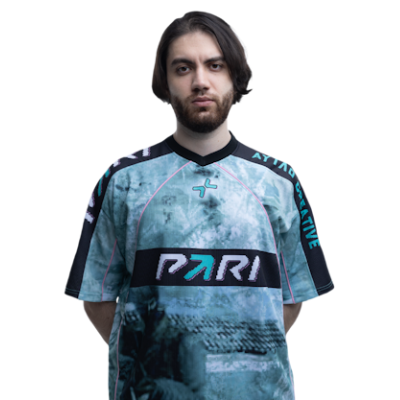
HenryJame CS2 settings are the blueprint for one of the most methodical and legendary AWPers in the history of the game. Known for his “Jame Time” playstyle and surgical precision, Dzhami Ali’s setup is optimized for extreme consistency and high-pressure clutches.
Whether you want to mirror his jame cs2 stats or just find the cs2 jame config that works for your hardware, this guide covers every detail of his 2026 setup.

Jame CS2 Mouse Settings & Sensitivity
Jame uses a high DPI combined with a very low in-game sensitivity. This provides a smooth, pixel-perfect feel that is essential for holding tight angles with the AWP.
| Setting | Value |
| DPI | 3200 |
| Sensitivity | 0.275 |
| eDPI | 880 |
| Zoom Sensitivity | 0.91 |
| Polling Rate | 1000Hz |
| Windows Sensitivity | 6 |
Pro Tip: If you’re coming from a different game, check out our guide on Valorant to CS2 sensitivity to match Jame’s precise feel.
Jame CS2 Video Settings & Resolution
Like many pros, Jame prefers a stretched resolution to make player models appear wider and easier to hit.
- Resolution: 1280×960
- Aspect Ratio: 4:3 (Stretched)
- Refresh Rate: 240Hz
- Brightness: 80%
- Boost Player Contrast: Enabled
- Global Shadow Quality: Very High
- Model / Texture Detail: Low
- Texture Filtering Mode: Bilinear
- Ambient Occlusion: Disabled
Finding the best sensitivity for CS2 is easier when your frames are stable. Jame’s low graphical settings ensure maximum FPS during chaotic executes.
Jame CS2 Crosshair Code

Jame uses a small, static green crosshair with a center dot. This setup offers maximum visibility without obscuring your target.
Copy-Paste Code: CSGO-v7J4e-759Lf-9RKeL-RLDHB-bN3ED
Manual Console Commands:
C#
cl_crosshairstyle 4; cl_crosshairsize 2.5; cl_crosshairgap -3; cl_crosshairthickness 0; cl_crosshairdot 1; cl_crosshaircolor 4;
If you want to try other pro styles, see how his compares to s1mple’s CS2 settings or m0nesy’s CS2 settings.
Jame CS2 Viewmodel & Launch Options
The viewmodel settings help keep the weapon model out of the way, providing a clearer view of the lower-right section of your screen.
Viewmodel Settings
- FOV: 68
- Offset X: 2.5
- Offset Y: 0
- Offset Z: -1.5
- Preset Position: 2
Launch Options
To apply Jame’s performance tweaks, paste these into your Steam Launch Options:
-novid -console -tickrate 128 +fps_max 400 -high
Jame’s Gaming Gear (2026)
Jame’s hardware is built for professional-grade responsiveness.
- Mouse: Razer Deathadder V3 Pro (White)
- Keyboard: Logitech G715
- Monitor: ZOWIE XL2546K
- Headset: HyperX Cloud II
- Mousepad: VAXEE PA FunSpark
While Jame focuses on performance, many players like to pair these settings with top-tier aesthetics. Check out the most expensive CS2 skins to see the kits the pros use on the big stage.
Frequently Asked Questions (FAQs)
What is Jame’s CS2 crosshair code?
Jame uses a small green crosshair with a dot. The current code is CSGO-v7J4e-759Lf-9RKeL-RLDHB-bN3ED. If you want to explore more styles, check out our CS2 crosshair guide.
What resolution does Jame use in CS2?
Jame plays on 1280×960 with a 4:3 Stretched aspect ratio. This is a favorite among pros because it makes player models appear larger. You can learn more about this in our CS2 4:3 resolution guide.
Why is Jame’s sensitivity so low?
Jame uses a very low in-game sensitivity (0.275) paired with a high DPI (3200). This provides extreme precision for AWPing, which is crucial for his role as the primary sniper for Virtus.pro.
Does Jame use any special binds?
Like most top-tier players, Jame utilizes specific binds for utility and movement. For example, a jump throw bind CS2 is essential for consistent smokes on maps like Mirage.
Final Thoughts
Adopting Jame CS2 settings won’t instantly turn you into a Major-winning IGL, but it provides a rock-solid foundation for tactical play. Jame’s setup is all about consistency and minimizing distractions. If you find his sensitivity too slow, don’t be afraid to tweak it—even the pros adjust their CS2 pro settings occasionally.Once you have your config ready, make sure you know the maps as well as he does by studying CS2 Mirage callouts and CS2 Inferno callouts.